Node Sculptor
A node graph for curves, meshes, fields, and toolpaths—typed sockets, reusable branches, and a 3D preview that tracks every wire. Build procedural parts and print-ready G-code without leaving the canvas. Prefer Scratch-style blocks? That is SynthBlocks.
Wire, preview, iterate
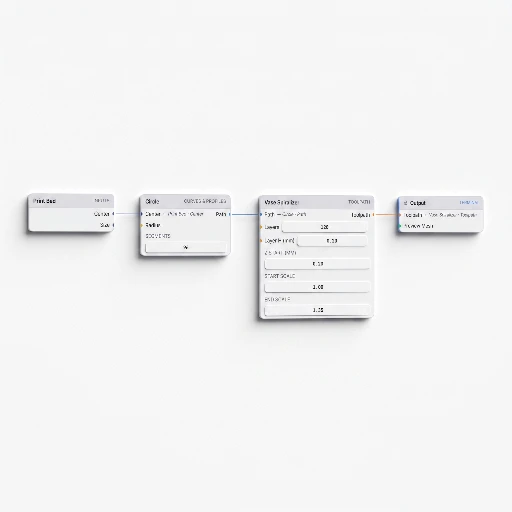
The canvas is a live program: drag nodes, connect only compatible sockets, and watch geometry and toolpaths update as the graph evaluates.
- Typed graph — sockets carry numbers, vectors, curves, meshes, and more; bad connections never compile.
- Live 3D preview — orbit and inspect mesh and toolpath output while you edit upstream nodes.
- Evaluation you can trust — the graph walks in dependency order; broken links surface before you export.
- Undo and history — experiment freely; step backward when a branch goes sideways.
- Projects and library — save graphs as
.3dsynthfiles or share through the Library (Premium).
One graph, many layers
The add menu groups nodes by job: inputs and math at the bottom, curves and lists in the middle, SDFs and mesh ops above, slice and spiralize nodes at the end. Everything feeds the same Output node.
Inputs and math
Numbers, vectors, expressions, remaps, and noise drive parameters—no hard-coded magic values scattered through the graph.
Curves and sets
Lines, arcs, polylines, Voronoi outlines, series and list ops: the 2D skeleton most toolpaths and profiles start from.
Surfaces and SDFs
Loft, sweep, pipe, marching cubes, and boolean-ready meshes—build solids before you ever slice them.
Toolpath
Slice, layer stack, vase spiralizer, contour and spiral modes, seam shift, travel optimize, adaptive layers, flow modulate—printer-facing control at the end of the wire.
Think in wires, not walls of code
Node graphs reward the same habits as good software: small reusable pieces, explicit data flow, and a picture of the whole pipeline. That makes Node Sculptor a strong fit for studios, classrooms, and anyone who already sketches systems on a whiteboard.
- Reuse and variation — branch a number or curve once; downstream nodes inherit every tweak.
- Fields and modulation — attractors, noise, and path modulation turn flat geometry into responsive design space.
- Explicit structure — lists, ranges, and series make iteration visible instead of buried in loops.
- Same preview as export — what you see in the viewer is what the export pipeline evaluates.
- No install — runs in the browser; share one link and teach or review the same graph.
From graph to G-code
The Output node terminates the graph: mesh and toolpath data flow in, validated G-code and previews flow out—one evaluation path for the viewport and the file on disk.
Evaluate
Nodes run in topological order; missing inputs and type mismatches fail fast with clear graph feedback.
Preview
Meshes and polylines draw in the 3D viewer; toolpath coloring separates travel from extrusion before you commit filament.
Export
Write .gcode with printer profiles, start and end scripts, and temperatures aligned to your Print settings.
Bed and machine
The Print Bed input and slice nodes respect real build volume—design against the printer you own, not an abstract cube.
Node library
Same families as the in-app add menu—each link opens the matching article in the documentation. This page lists the groups, not every node. For the full catalog, open Node Sculptor in docs. Walkthroughs live under Tutorials.
Also in the catalog (not shown in the groups below): Load mesh, Load SVG, Load image, String Art, Infill, Logic If, Gate, and NURBS.
Inputs
Math
Vector & transform
Curves & profiles
Sets & lists
Fields
Surfaces
SDF primitives
SDF combine & mesh
Toolpath
Library
Node Sculptor in the wild.
Real projects from the community library. Click any thumbnail to open in the app and remix.
What Node Sculptor is
Node Sculptor is a typed node graph for procedural geometry and toolpaths. Use it when a single profile stack is not enough.
- Input: a graph of nodes (curves, fields, meshes, toolpath helpers) plus Print presets.
- Output: G-code in toolpath mode, or a mesh when the graph is mesh-oriented. Export is not Premium-gated.
- Unlike SynthBlocks: nodes and wires, not Scratch blocks. Unlike G-code Sculptor: you compose many operators instead of one silhouette stack.
- Limits: more to learn. Invalid sockets fail early. Not a SolidWorks replacement for assemblies.
- Learn: node graph · docs overview · spiral vase tutorial · node-based guide
Build it in the app.
Free to tinker. Open Node Sculptor, drop an Output node, wire curves into a slice, and watch the toolpath appear in 3D.