Custom G-code
A full editor for G-code files—import from any slicer, edit with syntax help and autocomplete, preview every move in 3D, and analyze structure before anything touches plastic. Bidirectional selection syncs code and viewport. The right place when G-code is the source of truth. Generate elsewhere in 3dSynth? Open that output here for inspection without starting from scratch.
Editor, meets printer
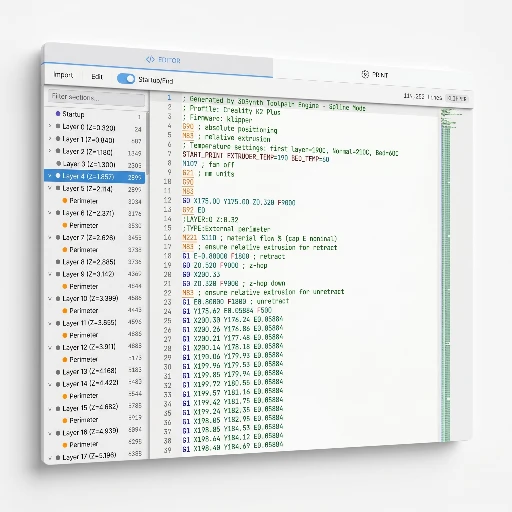
The same text the printer will execute—no hidden intermediate format. Theme-aware highlighting, folding, and search tuned for long slicer jobs.
- Monaco engine — same editor as VS Code, tuned for G-code with purpose-built syntax highlighting.
- Autocomplete — type G or M to see 30+ commands with descriptions and expected parameters.
- Hover documentation — hover any recognized command for a tooltip explaining what it does.
- Structural folding — collapse startup, layers, and shutdown to navigate 100k-line files fast.
- Find and replace — Ctrl+F / Ctrl+H, regex, case-sensitive, and whole-word matching.
See what the nozzle sees
The 3D viewer color-maps the toolpath by speed, flow, temperature, fan, layer, and more. Scrub through execution like a video timeline, or step command by command.
8 color modes
Speed, flow, volumetric flow, acceleration, line type, temperature, fan, and layer index—switch modes from the toolbar to expose bottlenecks and cooling strategy.
Structural outline
A hierarchical tree of layers and regions from Z changes and slicer comments (Cura, PrusaSlicer, Orca, Simplify3D)—click to jump the editor and highlight the path.
Playback controls
Play, pause, step forward and backward, and jump to the next layer, retract, or temperature change—with live machine state along the scrub bar.
Bidirectional selection
Select lines in the editor to light up segments in 3D; click a segment in the viewer to scroll to the source line.
Analyze before you print
The metrics panel computes print time, filament usage, flow rates, and travel ratio—for the whole file or just your selection. Hover any segment in 3D for a tooltip with line number, speed, flow, and section label.
- Print time estimate — duration from feedrates and distances across the job.
- Filament stats — length, volume, and weight when material density is set.
- Flow analysis — average and peak volumetric flow, retraction counts and distance.
- Selection-scoped — select a range and the panel answers “how long is this layer?” without mental math.
- Inspection tooltip — hover any toolpath segment for the raw command, speed, flow, and temperature.
Edit with precision
Select any range and apply targeted changes—multiply speed, scale flow, insert temperature or pause commands. Batch operations normalize feedrates or toggle extrusion mode. Snapshots version your edits; the debugger steps through commands and surfaces full machine state. Marlin, Klipper, and RepRap/Duet dialects are auto-detected from the file.
Selection tools
Change speed, flow, temperature, or fan; insert pauses, custom snippets, or M600 on the selection—with undo if it misbehaves.
Batch operations
Normalize feedrates, merge redundant temperature commands, strip no-op moves, or switch between absolute and relative extrusion.
Snapshots
Named save points for the full source—restore or compare before risky edits. (Limit: 10 snapshots per module.)
Debugger
Step line by line, set breakpoints, and inspect X/Y/Z, E, F, temps, fan, flow, and retraction state like a real debugger—for printer instructions.
The line-by-line G-code Inspector dock is a Premium feature—see Free vs Premium in the docs.
Import more than a .gcode file
The editor still treats G-code text as the source of truth. These tools get you there from slicer packages, thin meshes, or a path you already generated in 3dSynth.
- 3MF / UFP / ZIP — extract the G-code entry from a container. Original archive bytes are not stored.
- Thin STL / OBJ — import as planar contours (no supports). Useful for a 2D outline that should become a toolpath.
- Bed array — copy the motion body across the bed (grid or polar). Startup and shutdown stay once; a bed-fit warning fires if copies leave the machine volume.
- Brush & pattern select — paint a region on the 3D path, or select by feature, height band, ring clip, and periodic rules.
- Path deform — move, rotate, scale, or deform the selected points with intensity-weighted blending.
Details live in the in-app docs: Custom G-code overview · Tools.
Documentation
Deep dives on the editor, analysis tools, and command reference—same articles as the in-app documentation browser.
Getting started
What Custom G-code is
Custom G-code treats the file as the source of truth: import or paste G-code, edit it, analyze it, and preview every move in 3D.
- Input: a G-code file (from 3dSynth or another slicer/tool).
- Output: the edited G-code file. Analysis and playback stay in the app.
- Unlike G-code Sculptor: you are not drawing a profile. Unlike SynthBlocks: you are not compiling a program—you are editing text with a synced viewer.
- Limits: it will not magically add supports or reslice a mesh. You still own printer safety.
- Learn: G-code · docs overview · tutorial 01 · preview guide
Inspect it in the app.
Free to tinker. Open Custom G-code, drop in a file from any slicer, and see every move before it touches plastic.