Predefined models
Choose a parametric part from the in-app catalog, tune sliders, and export G-code—no profile curve, node graph, or block canvas. The list starts small and grows over time. Need a full editor on the result? Open the file in Custom G-code.
Catalog
Each model ships with a focused parameter panel and a live toolpath preview. Printer presets (machine, nozzle, material) come from the same Print tab as the rest of the app.
- Pick a model from All models in the app—today that is one entry; more will appear here as they ship.
- Dial parameters — dimensions, waves, overlap, quantity, and other sliders defined per part.
- Preview — orbit the generated toolpath before you download.
- Export — download G-code ready for your configured machine.
Nonplanar Spacer
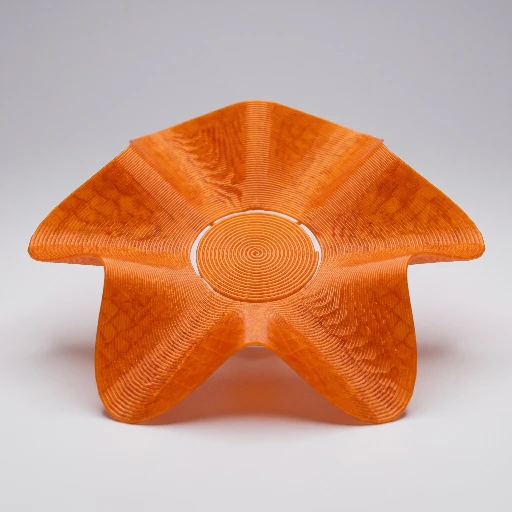
Circular spacer with sinusoidal non-planar waves around the rim: a single continuous spiral from the inner hole outward, with wave amplitude ramping from flat at the center to full height at the outside—useful as a flexible, interlocking spacer or decorative washer stack.
More models later
The marketing site stays light on purpose: when new parts land in the app, this page and the documentation index will grow with them. For the latest module overview, use Predefined models in the docs.
What Predefined models are
Predefined models are catalog parts with parameters. Skip the profile editor and the graph when you want a known-good toolpath fast.
- Input: a catalog model plus its parameters and Print presets.
- Output: G-code (and mesh exports where the module caps allow). Free export is not Premium-gated for this module.
- Unlike G-code Sculptor: you do not draw the silhouette. The catalog is smaller than a full CAD library; some models may be disabled in the UI until they are ready.
- Limits: not a substitute for designing custom parts in CAD. Walkthrough tutorials are limited.
- Learn: project · docs overview · tutorial 01
Open the catalog in the app.
Free to tinker. Launch 3dSynth, choose Predefined models, and start with Nonplanar Spacer—then watch the toolpath update as you move the sliders.