Fabric Sculpt
Build 2D line patterns with generators, optionally refine them through a filter stack (order matters), then export stacked extrusion G-code with the same 3D preview workflow as other toolpath modules. This is not the radial vase path—that is G-code Sculptor. Tile-driven floors that feed a vase toolpath live in Hex grid.
From pattern to layers
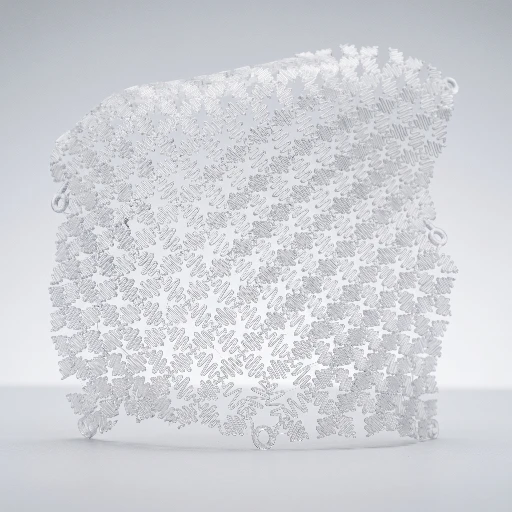
The Pattern tab is three moving parts: pick a generator, stack filters, then set how the path repeats in Z.
- Generator — choose a line pattern; switching generators resets parameters to that plugin’s defaults.
- Filters — add from Add filter; each row has enable and remove. Top to bottom is execution order.
- Stack (G-code) — Layers repeats the toolpath at each layer height; Alternate layer rotation (e.g. 90°) cross-hatches odd layers; Z offset lifts the first layer when you need it.
- Convex hull border — optional outline around the bed-fitted footprint to anchor open patterns.
- Print tab — nozzle and material presets merge into the worker; speeds, layer height, and retraction follow your global Print settings.
A shelf of line generators
Eleven built-in generators cover grids and lattices, spirals and spirographs, weaves, space-filling curves, honeycomb meshes, and organic Voronoi cells—each with its own parameter page in the docs.
Grids and strokes
Parallel lines, wave lines, grid lattice, and radial spokes give you fast structured coverage—good baselines before filters.
Curves and spirals
Archimedean spiral, concentric curves, and Spirograph (hypotrochoid) rosettes trade straight segments for continuous motion the printer can follow smoothly.
Weave, fill, and organic
Fabric weave, Hilbert curve, hexagonal mesh, and Voronoi mesh lean into texture, space-filling paths, and irregular cells—pair with Z-Undulation and alternate rotation for woven 3D relief.
Filters reshape the path
Every filter is optional, reorderable, and toggleable—use them to warp, connect, smooth, modulate extrusion, or optimize travel without leaving the module.
- Sine & noise displacement — axis-aligned sine or procedural noise along the path.
- Twist & ripple — rotational falloff or radial waves from a center.
- Weave offset — alternating phase for cloth-like offsets.
- Connect paths — merge nearby endpoints into longer continuous traces.
- Transform — scale, rotate, and translate the whole pattern.
- Z-Undulation — sinusoidal Z along the path; combines with alternate layer rotation for tight woven prints.
- Variable extrusion — modulate flow along the path.
- Corner rounding — Chaikin-style smoothing on corners.
- Path optimizer (TSP) — reorder paths to cut down travel.
Export that respects your machine
Fabric Sculpt is G-code first: no STL export from this module. Files follow the same shape as Hex Grid—custom startup and shutdown from your printer profile when set, then a mode fence that forces millimeters, absolute XYZ (G90), absolute extrusion (M82), and G92 E0 so relative extrusion in a custom header cannot break the pattern. Paths are scaled and centered to fit the configured bed (with center-origin behavior when your machine uses it). After download, open the file in Custom G-code to inspect or post-process with full editor tooling.
Printer presets
Machine, nozzle, and material from the Print tab feed the exporter—layer height and line width come from there, not from duplicate fields in Fabric.
Startup and shutdown
Your profile’s startup and shutdown G-code wrap the job; placeholder expansion matches other toolpath modules. Without custom startup, the app emits homing, heat-up, then safe modes before the pattern.
Bed fit
Oversized patterns scale down; smaller ones stay at natural size and center. If the preview looks tiny, check that your configured bed matches the plate you expect.
Generators & filters
Every plugin has a dedicated documentation article. Tutorials live in the app—open Tutorials from the workspace.
Getting started
Generators
Filters
Filters (continued)
What Fabric Sculpt is
Fabric Sculpt turns 2D line generators and a filter stack into layered extrusion paths, fitted to the bed from your Print presets.
- Input: generators (lines, spirals, waves, …), filters, layer count, Print presets.
- Output: G-code. Not STL.
- Unlike Hex Grid: freeform line art vs painted hex tiles. Unlike G-code Sculptor: no radial vase profile.
- Limits: specialized decorative/path prints—not mechanical CAD. Tutorials for this module are still thin; use the docs overview.
- Learn: direct G-code · docs overview · tutorial 01 · direct G-code guide
Stack it in the app.
Free to tinker. Open Fabric Sculpt, pick a generator, add a filter or two, and preview the stacked toolpath in 3D before you download G-code.