Available now

3dSynth generates
G-code directly.

A generative toolpath synthesizer for creative 3D printing. Build organic vases, lampshades, and sculptural forms using mathematical rules and stackable effects.

Browser version has limited features. Full version available for Windows, macOS, and Linux.
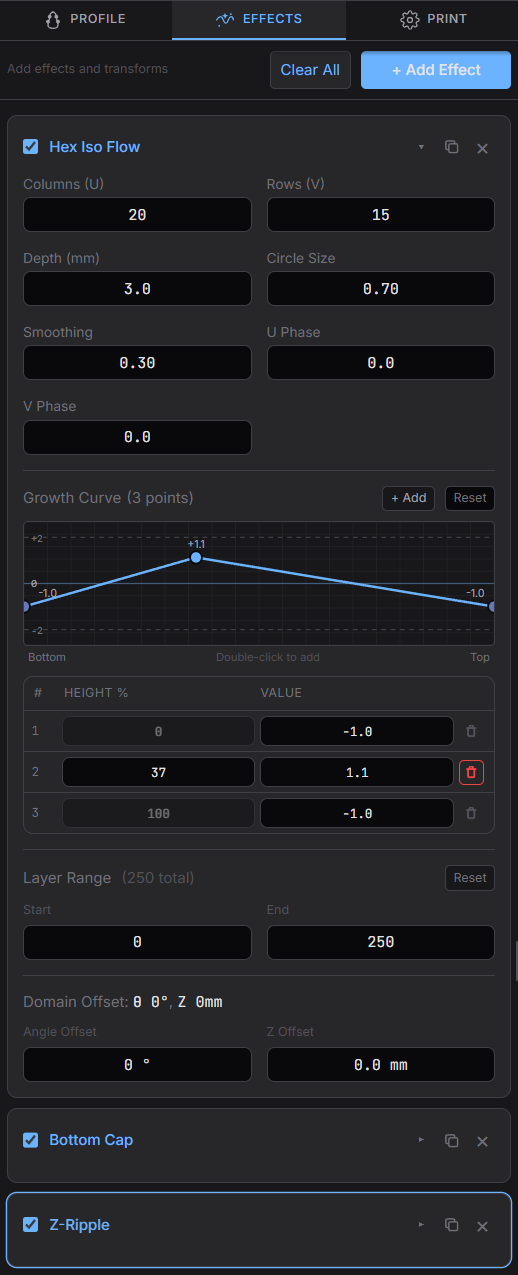
3dSynth Interface 3dSynth Interface

What makes it different

3dSynth bypasses traditional mesh-based workflows entirely. Your printer receives instructions generated directly from parameters you control.

Direct G-code generation

No intermediate STL files. No mesh repair. No slicer settings to fight. Toolpaths are computed mathematically from your design parameters.

Parametric control

Every aspect of your form is defined by numbers you can tweak. Adjust frequencies, amplitudes, phases. Watch the shape respond in real time.

Modular effect stack

Layer ripples, blobs, noise, twist, and more. Each modulator can be precisely ranged to specific heights. Stack them to create complex surfaces.

Real-time preview

See your toolpath as you design. The 3D viewer updates instantly. Inspect layers, measure dimensions, catch problems before printing.

Spiral vase mode

Designed for continuous Z printing. Single-wall vessels, organic textures, translucent effects. Perfect for vases, lampshades, and decorative objects.

Printer-ready output

Export G-code configured for your machine. Built-in profiles for Prusa, Bambu Lab, Creality, Voron, and more. Proper start and end sequences included.

How it works

Three steps from idea to print. No modeling software required.

1

Define your profile

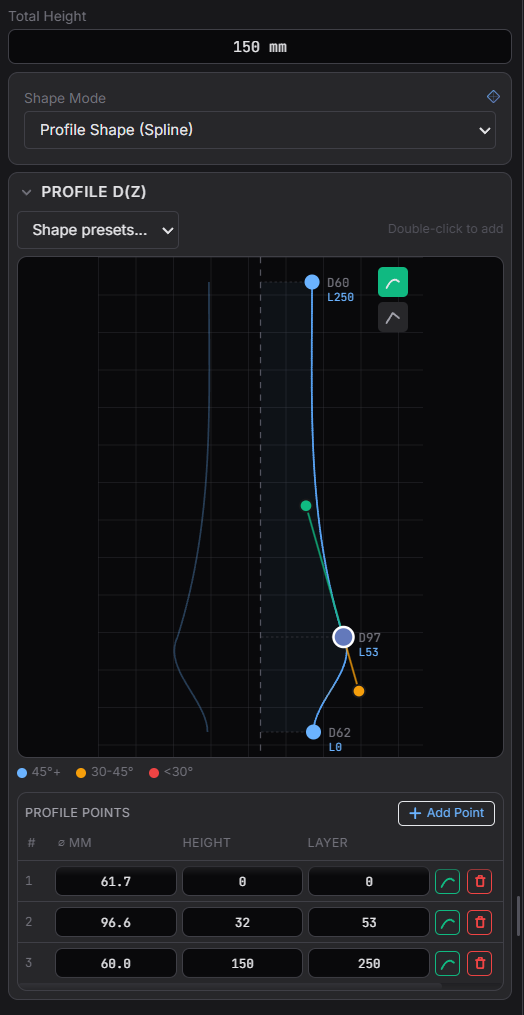
Use the spline editor to draw your base shape. Control the radius at different heights to create the silhouette of your object.

2

Stack modulators

Add effects that modify the toolpath. Ripples, noise, polygons, blobs. Each modulator transforms the geometry in a specific way.

3

Export and print

Download G-code ready for your printer. Load it directly. No post-processing needed. The file is complete and optimized.

Who it's for

3dSynth is built for people who want direct control over their toolpaths.

Artists and designers exploring form through mathematics and code

Makers who want more control than traditional slicers allow

Creative technologists experimenting with generative fabrication

Anyone tired of the STL-slicer-print pipeline

Simple pricing

Try free in your browser, or get the full desktop app with all features unlocked.

Free
€0
Browser version with generous features
  • Profile spline editor
  • Up to 4 modulators stacked
  • 15 free effect types
  • Real-time 3D preview
  • G-code export
  • Save/load presets
  • 16 premium effects
Try free

Questions & answers

Everything you need to know before you start printing.

What printers are supported?
3dSynth generates standard G-code that works with any FDM/FFF 3D printer. Built-in profiles are included for popular machines like Prusa, Bambu Lab, Creality, Voron, and more. You can also configure custom printer settings.
How is this different from a slicer?
Traditional slicers convert 3D models (STL/OBJ) into G-code. 3dSynth generates toolpaths directly from mathematical parameters—no 3D model needed. This gives you precise control over forms that would be difficult or impossible to model conventionally.
Do I need 3D modeling experience?
No. 3dSynth uses a different approach: you define shapes through profile curves and stackable effects. If you can adjust sliders and see results in real-time, you can use 3dSynth. The built-in presets give you starting points to explore.
What can I create with it?
3dSynth excels at vases, lampshades, decorative vessels, and sculptural objects. The spiral vase mode creates single-wall prints with continuous Z movement—perfect for translucent effects and organic textures.
Is the G-code safe to print?
Yes. The generated G-code includes proper start and end sequences for your printer, with heating, homing, and cooling commands. Print time and filament usage are estimated before export so you know what to expect.
Can I use prints commercially?
Absolutely. Once you purchase a license, you own full rights to anything you create and print. Use your designs for personal projects, sell prints, or incorporate them into commercial products.
Status
Available Now
Platforms
Windows, macOS, Linux
Free Demo
Browser version
Focus
Creative exploration

Ready to experiment?

Get the full desktop app for Windows, macOS, and Linux. Or try the free browser version first.